How it works
Choose a photo
Dark parts of the photo become thick and bright parts thin, between the two thicknesses you set.
Check the light preview
The backlit view simulates light shining through the plate, so you can adjust before printing.
Download and print
Save an STL or 3MF. The solid border keeps the edges strong and gives it a clean frame.
Example
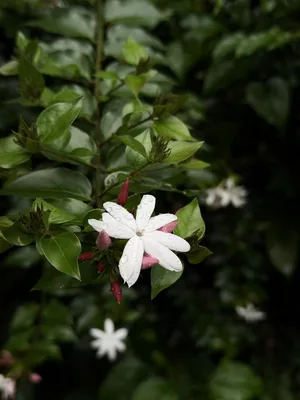
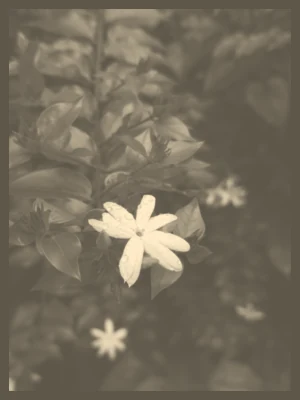
A jasmine flower against dark leaves: a good photo for a lithophane, because the bright flower becomes the thinnest, brightest part and the dark background stays thick. Made with the default settings.
Printing tips
- Use white or natural PLA. Coloured and dark filaments let much less light through.
- Set infill to 100%. Any gaps inside the plate show up as patterns when it is lit.
- Use a fine layer height, around 0.1 to 0.12 mm, and a slow outer wall for smooth detail.
- Print it flat, flat side down, for the easiest print with no supports. Some people print lithophanes standing upright for finer detail; that needs a brim and a steady printer.
- Light it from behind with an LED panel, a string of LEDs in a box, or a window. A phone torch is enough for a first look.
New to lithophanes? Read the guide: how to make a lithophane from a photo.
Questions and answers
What is a lithophane?
A thin plate whose thickness follows a photo. With a light behind it, the thick parts look dark and the thin parts look bright, so the picture appears. Without light it just looks like a pale, bumpy plate.
How is a lithophane different from a relief?
A lithophane is made to be seen with light shining through it, so only the brightness of the photo matters. A relief is seen in normal light, from the front, and needs real depth. For a plaque to hang on a wall, use the relief tool; see also relief or full 3D model.
Which thickness should I use?
The defaults, 0.8 mm at the thinnest and 3 mm at the thickest, are a common starting point for white PLA. A thinner minimum gives brighter highlights but is more fragile; a thicker maximum gives deeper shadows but needs a brighter light.
Can I use a colour photo?
Yes. The photo is turned into brightness, so the lithophane is greyscale when lit. Photos with clear contrast, such as a face in soft light, work best.
Is my photo uploaded?
No. The lithophane is made in your browser, on your device. Unlike the relief tool, it needs no AI model, so it starts straight away.